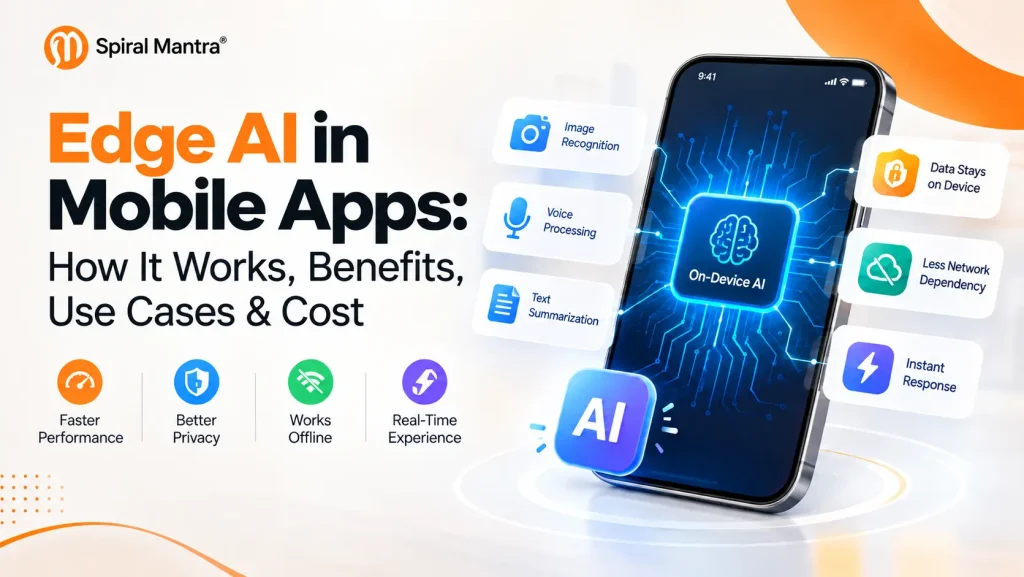
Edge AI in Mobile Apps: How It Works, Benefits, Use Cases & Cost
AI is quickly becoming part of the mobile product experience. Voice assistants, document scanning, image recognition, translation, recommendations, personalization, and generative AI are no longer experimental features. For many businesses, they are becoming part of how customers interact with their products. But there is a practical question behind every AI-powered mobile feature:Where should the AI actually run?
The traditional approach is to send data from the mobile device to a cloud server, process it there, and return the result. Cloud AI makes powerful models and large-scale computing available, but it also introduces network dependency, latency, data transfer, and ongoing infrastructure costs. Edge AI in mobile apps offers another approach: process suitable AI workloads directly on the device. That can mean faster responses, better offline functionality, and less data leaving the device. But Edge AI is not automatically the better choice. Device capabilities, model size, battery consumption, accuracy, security, and maintenance all matter. For CTOs, product leaders, and mobile engineering teams the real question is not whether Edge AI is better than cloud AI. It is which architecture makes the most sense for a specific product and workload.Key Takeaways
- Edge AI runs suitable AI workloads directly on mobile devices.
- On-device inference can reduce network-dependent latency.
- Local processing can reduce unnecessary data transmission.
- Edge AI can support selected offline AI functionality.
- Device hardware, battery, memory, and model size remain important constraints.
- Cloud AI remains useful for large and computationally intensive workloads.
- Hybrid AI can combine local inference with cloud-based models.
What is Edge AI in Mobile Apps?
Edge AI refers to running AI or machine-learning inference close to where the data is generated. For mobile applications, this often means running an AI model directly on a smartphone using available CPU, GPU, NPU, or other hardware acceleration. Instead of sending every input to a remote server, the application can process suitable workloads locally. For example, a mobile application could use on-device AI for:- Image classification
- OCR and document scanning
- Speech recognition
- Translation
- Text summarization
- Object detection
- Voice commands
- Image enhancement
- Personalization
- Recommendation features
Edge AI vs. Cloud AI
With Cloud AI, the mobile application generally sends data to a remote service for processing. With Edge AI, the model processes suitable workloads locally. There is also a third option: Hybrid AI. A hybrid architecture allows the application to decide which tasks should run on the device and which should be handled by the cloud. For example, a mobile app could handle image classification locally but send a complex generative AI request to a cloud model. That flexibility is increasingly important for businesses building production AI applications.Also Read: Flutter AI Integration Redefining Mobile App Development
How Does Edge AI Work in Mobile Applications?
 At a high level, an Edge AI workflow looks like this:
User Input → Mobile App → Data Processing → On-Device AI Model → Inference → Result
The process typically involves five steps.
At a high level, an Edge AI workflow looks like this:
User Input → Mobile App → Data Processing → On-Device AI Model → Inference → Result
The process typically involves five steps.
1. User Provides Input
The input could be a photograph, voice command, text, video frame, sensor reading, or another type of data.2. The App Prepares the Data
Before inference, the application may resize an image, normalize values, tokenize text, clean audio, or perform other preprocessing.3. The AI Model Runs Locally
An optimized model performs inference directly on the device. Depending on the platform and workload, processing may use the CPU, GPU, NPU, or other available hardware acceleration.4. The Application Receives the Result
The model could identify an object, classify an image, transcribe speech, summarize text, or generate another type of prediction.5. The Result Is Presented to the User
Because processing can happen locally, the application does not necessarily need to wait for a server request for every inference. This is where Edge AI can become valuable from a product perspective: the AI feature can become less dependent on the network and more responsive to the user's immediate interaction.How Edge AI Improves Mobile App Performance
 One of the biggest reasons businesses consider Edge AI is the possibility of creating more responsive mobile experiences.
1. Lower Network-Dependent Latency
Cloud-based AI usually requires a network request. The application sends data to a server, waits for processing, and receives the result. The actual experience depends on connectivity, network congestion, server response time, and the amount of data being transferred. For suitable workloads, local inference can remove part of that network dependency. This can be particularly useful for:- Camera-based object detection
- Real-time image analysis
- Voice interactions
- OCR
- Gesture recognition
- Intelligent input assistance
- Offline recommendations
- Model size
- Device hardware
- Memory availability
- Model optimization
- CPU/GPU/NPU utilization
- Thermal conditions
- Input complexity
- Operating system and runtime
2. Better Real-Time Experiences
Some AI features need frequent or immediate responses. Consider a camera application that needs to detect an object while the user is moving the phone. Or a voice feature that needs to respond naturally during an interaction. Sending every request to the cloud can introduce delays that become noticeable to the user. Local inference can make these experiences more responsive when the model and target device are suitable.3. Reduced Network Dependency
Edge AI can also help applications perform certain AI tasks when connectivity is weak or unavailable. This can be valuable for:- Field-service applications
- Travel applications
- Remote environments
- Offline productivity tools
- Industrial applications
How Edge AI Improves Privacy in Mobile Apps
Privacy is another important reason companies evaluate on-device AI. When inference happens locally, certain user inputs do not need to be transmitted to a remote AI service for processing. For example, an application processing a private document may be able to perform specific classification or extraction tasks directly on the device rather than uploading the complete document. This can reduce the amount of sensitive information that needs to leave the user's device. However, there is an important distinction: On-device AI does not automatically make an application completely secure or private. A secure mobile application still needs appropriate:- Data encryption
- Secure storage
- Authentication
- Authorization
- Permission management
- Secure APIs
- Model protection
- Privacy policies
- Data-retention practices
Key Benefits of Edge AI for Mobile Apps
When a workload is suitable for local processing, Edge AI can provide several benefits.| Benefit | What It Can Mean for Your Product |
|---|---|
| Lower latency | Less dependence on network round trips |
| Offline capability | Certain AI features can continue working without connectivity |
| Privacy | Sensitive inputs can potentially remain on the device |
| Reduced data transfer | Less information may need to be sent to servers |
| Real-time processing | Useful for camera, audio, and interactive features |
| Personalization | Some processing can use device-local information |
| Cost control | Some inference workloads can shift away from cloud infrastructure |
| Availability | Local AI functionality can remain available during connectivity problems |
Edge AI vs. Cloud AI vs. Hybrid AI: Which Is Right?
There is no universal winner. The right architecture depends on the application's requirements.| Factor | Edge AI | Cloud AI | Hybrid AI |
|---|---|---|---|
| Processing | On device | Remote server | Device + cloud |
| Internet dependency | Not required for local inference | Usually required | Flexible |
| Latency | Potentially low | Network-dependent | Workload-dependent |
| Privacy | Can reduce data transmission | Data may leave device | Depends on architecture |
| Model size | Device constrained | More server resources | Flexible |
| Offline functionality | Strong | Limited | Partial |
| Model updates | More complex | Easier | Flexible |
| Device compatibility | Important | Less restrictive | Balanced |
| Best suited for | Local, real-time workloads | Complex workloads | Mixed workloads |
| Typical use cases | Real-time vision, OCR, offline AI | Large models, complex reasoning | Mixed workloads |
Real-World Use Cases of Edge AI in Mobile Apps
Edge AI is relevant across industries, but the business case differs from one application to another.1. Healthcare
Edge AI can support suitable workloads such as sensor-data analysis, image preprocessing, and health-related monitoring. Healthcare applications require additional privacy, security, accuracy, and regulatory considerations, so AI functionality needs careful validation before deployment.2. Banking and FinTech
Financial applications can use local AI for areas such as:- Behavioral analysis
- Authentication support
- Document processing
- Fraud-signal preprocessing
3. Retail and E-Commerce
Retail applications can use Edge AI for:- Visual product search
- Product recognition
- Image-based search
- Personalized experiences
- Augmented-reality features
- Camera-based product interactions
4. Travel and Navigation
Local AI can support offline translation, image recognition, intelligent assistance, and other features where constant connectivity may not be available.5. Education
On-device AI can support:- Speech recognition
- Language learning
- Personalized learning
- Summarization
- Offline assistance
6. Manufacturing and Field Services
Field workers can benefit from mobile applications that perform image inspection, voice commands, document processing, or other AI tasks without continuous connectivity.7. Smart Home and IoT
Local processing can allow applications to analyze sensor events, voice commands, or device data without sending every event to the cloud.8. Media and Content
Edge AI can support image enhancement, video processing, speech features, content personalization, and other interactive experiences.Technologies Powering Edge AI in Mobile Apps in 2026
The mobile AI ecosystem now gives developers several options for on-device inference.1. Apple Core AI and Core ML
Apple's developer ecosystem includes Core AI for running and optimizing AI models on-device, while Core ML remains part of Apple's machine-learning stack. For language-model experiences, developers can also use the Foundation Models framework. Apple currently describes Foundation Models as a native Swift API for accessing Apple's on-device foundation models, with additional capabilities around language-model integration.2. Apple Foundation Models
The Foundation Models framework provides developers with APIs for integrating Apple's on-device foundation models into application experiences. This creates opportunities to build AI features that can make use of Apple's on-device capabilities while considering cloud processing when the application requires it.3. Android Gemini Nano and AICore
Google's current Android documentation states that Gemini Nano runs in Android's AICore system service and can perform supported generative AI workloads on-device. It also notes that this can reduce network dependency and support privacy/offline use cases. This can be useful for applications where offline functionality, privacy, or reduced cloud dependency is important.4. Google LiteRT
LiteRT provides a runtime for deploying machine-learning models and can use hardware acceleration such as GPUs and supported NPUs for suitable workloads.5. PyTorch ExecuTorch
ExecuTorch is PyTorch's edge inference solution and supports deployment across Android and iOS, with hardware acceleration options depending on the platform and device. The important point for CTOs is that the newest technology is not automatically the right technology. The choice should depend on the target platforms, model type, hardware, performance requirements, and how much control the engineering team needs over model optimization.How to Implement Edge AI in a Mobile App
Successful Edge AI implementation requires more than placing a model inside a mobile application.Step 1: Define Data and Privacy Requirements
Ask:- What data is processed?
- Is it sensitive?
- Can it remain on-device?
- Does any data need to reach the cloud?
- What should be retained?
- What happens if cloud connectivity is unavailable?
Step 2: Define the AI Use Case
Start with the business and user problem. Ask:- Does the feature require real-time responses?
- Does it need to work offline?
- Is the data sensitive?
- How frequently will inference occur?
- What level of accuracy is required?
Step 3: Choose Edge, Cloud, or Hybrid
Not every AI workload should run locally. Choose the architecture based on performance, privacy, model complexity, connectivity, and business requirements.Step 4: Select the Model
The model needs to achieve the required accuracy while fitting within the target device's memory and compute limitations.Step 5: Optimize the Model
Optimization may include:- Quantization
- Model compression
- Pruning
- Knowledge distillation
- Input optimization
Step 6: Select the Runtime
Depending on the platform and project, the engineering team may evaluate technologies such as Apple Core AI, Core ML, Foundation Models, Google AICore with Gemini Nano, LiteRT, or PyTorch ExecuTorch.Step 7: Test Across Real Devices
Testing on one flagship phone is not enough. Teams should test across different:- Smartphone models
- OS versions
- Hardware configurations
- Memory tiers
- Network conditions
Step 8: Monitor After Launch
Track:- Inference latency
- Memory usage
- Battery consumption
- Application crashes
- Model accuracy
- Device temperature
- User experience
The Challenges CTOs Should Consider
Edge AI brings clear opportunities, but it also changes the engineering and product equation.1. Device Limitations
Smartphones have less computing and memory capacity than many cloud environments.2. Model Size
Large models can increase application size and resource requirements.3. Battery Consumption
Continuous AI inference can increase CPU, GPU, or NPU activity and affect battery life.4. Device Fragmentation
Performance can vary considerably between devices, even within the same operating system.5. Model Updates
Updating an on-device model can be more complicated than updating a centralized server-side model.6. Accuracy vs. Performance
A highly accurate model may be too large or computationally expensive for some devices. Engineering teams often need to balance accuracy with latency, memory, energy consumption, and device compatibility.7. Security
Models embedded inside applications can introduce additional security and intellectual-property considerations. For CTOs, these are not simply development details. They can affect product architecture, operating costs, release cycles, user experience, and long-term maintenance.Should Your Mobile App Use Edge AI?
Edge AI may be a strong fit when your application requires:- Low-latency AI interactions
- Offline functionality
- Reduced data transmission
- Privacy-sensitive processing
- Frequent local inference
- Real-time camera or audio processing
- Very large models
- High centralized computing capacity
- Complex processing
- Centralized model management
- Capabilities that are impractical on target devices
How Much Does Edge AI Mobile App Development Cost?
There is no single fixed cost for Edge AI mobile app development. The investment depends on factors such as:- AI model complexity
- Custom model development
- Android and/or iOS support
- Native or cross-platform development
- Model optimization
- Data preparation
- Hardware acceleration
- Backend requirements
- Security requirements
- Testing across devices
- Long-term model maintenance
What makes Edge AI development more expensive?
For example:- Supporting many device generations
- Custom model development
- Advanced generative AI
- Offline functionality
- Extensive device testing
- Continuous model updates
- Security requirements
- Multiple platforms
Frequently Asked Questions
Q1. What is Edge AI in mobile apps?
Edge AI in mobile apps means processing suitable AI or machine-learning workloads closer to the user, often directly on the smartphone. This can reduce network dependency and support responsive, private, or offline-capable experiences.
Q2. How does Edge AI improve mobile app performance?
Edge AI can reduce network-dependent latency by processing suitable workloads locally. Actual performance still depends on the model, device hardware, optimization, memory, thermals, and workload complexity.
Q3. Can Edge AI work without an internet connection?
Yes. Certain on-device AI features can work without an internet connection when the required model and supporting resources are available locally. Hybrid features that depend on cloud processing will still require connectivity for those tasks.
Q4. Is Edge AI more private than Cloud AI?
On-device AI can improve privacy for suitable workloads because data may be processed locally instead of being transmitted to a remote server. However, Edge AI alone does not guarantee complete application security or privacy.
Q5. What is the difference between Edge AI and on-device AI?
On-device AI specifically refers to AI processing directly on a user's device. Edge AI is a broader concept that includes AI processing close to where data is generated, including mobile devices and other edge hardware.
Q6. Which technologies are used for Edge AI mobile app development?
Depending on the platform and use case, developers can evaluate technologies such as Apple Core AI, Core ML, Android AICore/Gemini Nano, LiteRT, and PyTorch ExecuTorch.
Q7. Is Edge AI suitable for Android and iOS apps?
Yes. Both ecosystems provide technologies for on-device AI, although supported features and hardware capabilities vary by device and operating-system version.
Q8. What are the main challenges of Edge AI?
Common challenges include model size, device limitations, battery consumption, hardware fragmentation, model updates, security, testing, and balancing AI accuracy against performance.
Q9. Should I choose Edge AI, Cloud AI, or Hybrid AI?
The right choice depends on the application's requirements. Edge AI is useful for suitable local, privacy-sensitive, real-time, or offline workloads. Cloud AI can support larger and more complex workloads, while hybrid AI combines both approaches.
Q10. How much does Edge AI mobile app development cost?
There is no single fixed price. Cost depends on the AI model, application complexity, platforms, optimization requirements, backend architecture, security, testing, and maintenance.
Q11. What are the benefits of Edge AI in mobile apps?
The major benefits of Edge AI in mobile apps include:
- Lower network dependency
- Potentially lower latency
- Offline capability
- Reduced data transfer
- Real-time processing
- Potential privacy benefits