Azure DevOps Consulting Services help businesses plan, implement, and improve software delivery through continuous integration, continuous delivery, and workflow automation. An Azure DevOps Consultant can assess existing development processes, configure pipelines, integrate testing and security checks, and help teams establish a more reliable release process.
Many businesses face similar challenges: manual testing, inconsistent deployments, disconnected tools, and delays between development and production. Addressing these problems requires more than adopting a new platform. Organizations need a practical strategy that connects engineering improvements with business objectives.
This guide explains Azure DevOps consulting, automation capabilities, CI/CD implementation, consulting costs, and how to choose a suitable DevOps services company.
Key Takeaways
- Azure DevOps Consulting Services help organizations improve software delivery, collaboration, and release management.
- Azure DevOps supports work planning, source control, automated builds, testing, package management, and deployment.
- An Azure DevOps CI/CD Pipeline helps automate repetitive tasks and identify defects earlier.
- Azure DevOps Pipelines can support deployments to Azure, other cloud platforms, and on-premises environments with appropriate configuration.
- Security, monitoring, testing, and recovery planning are essential to reliable software delivery.
- Consulting outcomes should be measured through deployment frequency, lead time for changes, change failure rate, and recovery time.
What Is DevOps, and What Is Azure DevOps?
DevOps is a set of practices and cultural principles that brings software development and IT operations closer together. It encourages collaboration, automation, continuous feedback, and more consistent software releases.
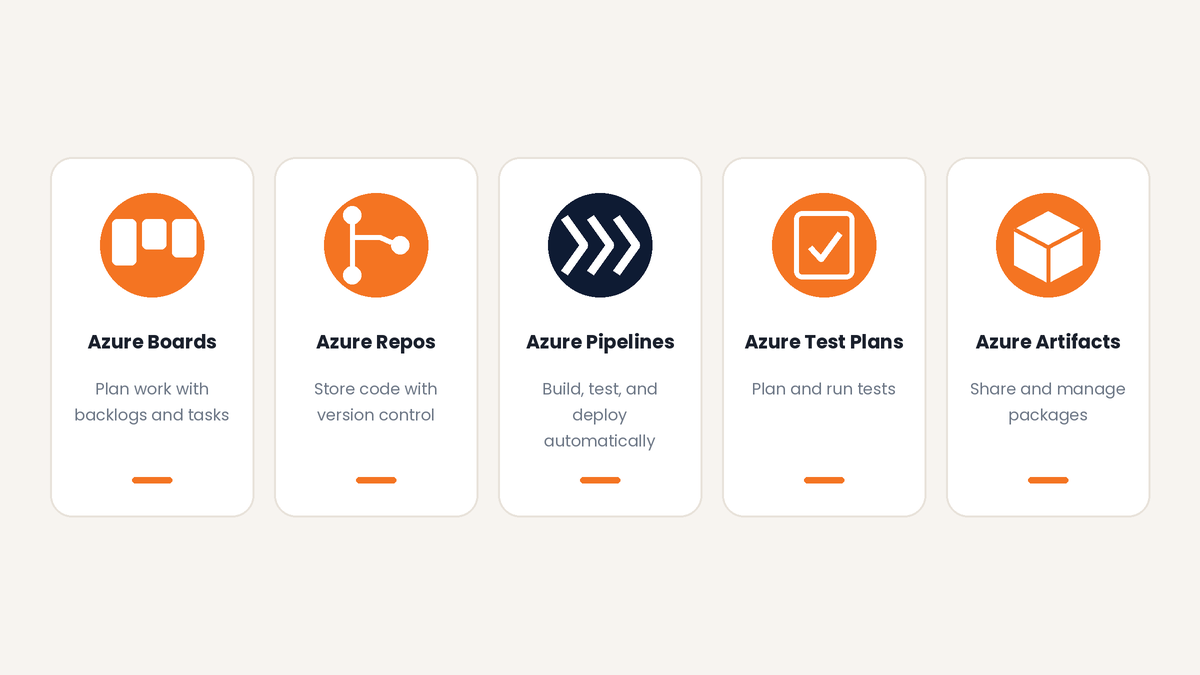
Azure DevOps is Microsoft's platform for managing and supporting software development and delivery. Its main services include:
- Azure Boards: Manages tasks, user stories, backlogs, and work items.
- Azure Repos: Provides source code repositories and version control.
- Azure Pipelines: Automates software builds, testing, and deployments.
- Azure Test Plans: Supports test planning and execution.
- Azure Artifacts: Helps teams store and share software packages.
 Organizations can adopt these tools according to their needs instead of implementing every service at once. DevOps practices can also use platforms such as GitHub Actions, GitLab CI/CD, and Jenkins.
What Are Azure DevOps Consulting Services?
Azure DevOps Consulting Services help businesses assess their existing delivery processes and implement improvements using Azure DevOps and related technologies.
A consulting engagement typically begins by identifying technical bottlenecks, delivery risks, and operational requirements. The provider then recommends an implementation plan based on the organization's applications, infrastructure, and development practices.
Typical deliverables include:
- Assessment of existing development and deployment workflows.
- Repository, branching, and access-control strategy.
- CI/CD architecture and pipeline configuration.
- Infrastructure as Code integration.
- Testing and security integration.
- Monitoring, reporting, and troubleshooting processes.
- Documentation, knowledge transfer, and ongoing optimization.
For example, a company that deploys an application manually may need a repeatable release workflow. An enterprise with several development teams may need shared pipeline templates and consistent governance.
The goal is to establish a maintainable delivery process that meets the organization's technical and business requirements.
Example: How Azure DevOps Consulting Can Improve Delivery
Consider a company that releases a business application every two weeks. Developers build the application, testers validate changes manually, and an operations engineer coordinates production releases.
A consulting engagement could follow this approach:
- Assess the existing process: Identify bottlenecks in code management, testing, deployment, and security.
- Define the target workflow: Decide which activities should be automated and which require human approval.
- Implement the solution: Configure pipelines, validation checks, and environment-specific deployment stages.
- Establish operational controls: Define permissions, monitoring, recovery procedures, and documentation.
- Measure the results: Compare release frequency, build duration, deployment failures, and recovery time against the original baseline.
Actual results depend on application complexity, existing practices, and implementation quality. Baseline measurements help determine whether the changes deliver meaningful improvements.
Why Do Businesses Need an Azure DevOps Consultant?
An Azure DevOps Consultant can help organizations address delivery challenges that internal teams may not have the time or specialist experience to resolve.
1. Reduce Manual Work
Automation can replace repetitive build, testing, and deployment tasks with defined workflows, allowing engineers to focus on development and improvement.
2. Improve Release Consistency
Standardized pipelines help teams follow repeatable processes instead of relying on individual employees to remember every deployment step.
3. Identify Defects Earlier
Build validation and automated tests can detect problems before changes reach production, reducing the risk of avoidable release issues.
4. Strengthen Delivery Security
Consultants can help configure permissions, protected branches, secret management, dependency checks, and controlled production access.
5. Support Growing Development Teams
Reusable templates and documented processes help organizations maintain consistent practices as the number of applications and development teams increases.
6. Improve Operational Visibility
Pipeline reports, work tracking, and deployment records help managers identify bottlenecks and understand delivery performance.
Consider hiring an Azure DevOps Consultant when releases are unreliable, deployment processes are difficult to maintain, cloud migration is planned, or several teams need a consistent delivery approach.
How Does an Azure DevOps CI/CD Pipeline Work?
A CI/CD pipeline automates defined stages of the software delivery lifecycle.
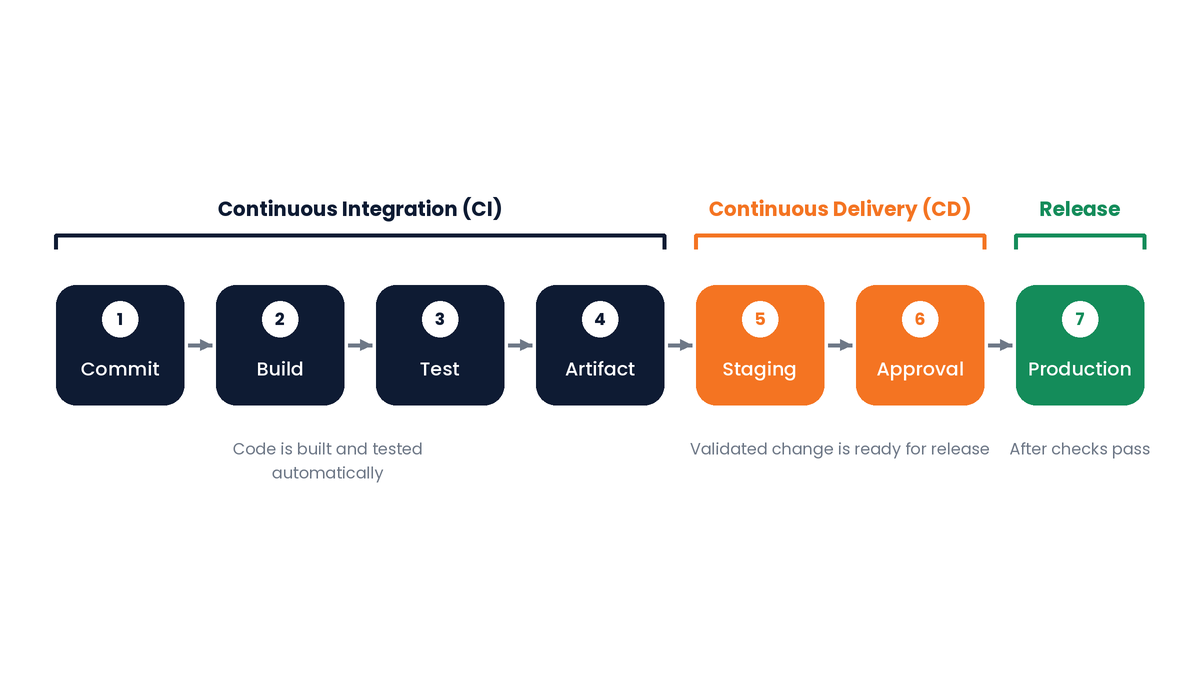
Continuous Integration (CI) involves integrating code changes frequently and validating them through automated builds and tests.
Continuous Delivery (CD) keeps validated changes ready for release, often with an approval before production deployment.
Continuous Deployment automatically releases eligible changes to production when the required checks pass.
A typical Azure DevOps CI/CD pipeline follows these steps:
- A developer commits code to a repository.
- A configured trigger starts the pipeline.
- The application is built.
- Automated tests and validation checks run.
- A deployable artifact is created.
- The artifact is deployed to a test or staging environment.
- Required checks and approval conditions are evaluated.
- The application is released to production when all required conditions are satisfied.
 The exact workflow depends on the application, testing requirements, deployment architecture, and business risk. Teams should define clear failure-handling and rollback procedures before using the pipeline for critical releases.
What Is Azure DevOps Automation?
Azure DevOps Automation uses pipelines, scripts, templates, and integrations to execute repetitive development and delivery tasks according to predefined rules or triggers.
Common examples include:
- Building and compiling application code.
- Running unit and integration tests.
- Scanning code and dependencies for security issues.
- Creating deployment packages and container images.
- Provisioning infrastructure through code.
- Deploying applications to configured environments.
- Sending notifications when pipeline runs fail.
- Collecting test results and execution reports.
For example, a team can configure a pipeline to build a web application, run its tests, create a release package, and deploy that package to staging after successful validation.
Automation is most effective when the underlying process is reliable. Teams must also configure failure handling, monitoring, access controls, and recovery procedures so that automated workflows remain manageable.
What Services Are Included in Azure DevOps Consulting?
This section focuses on the specific services and deliverables a provider can implement, rather than repeating the pipeline implementation steps explained later.
1. Azure DevOps Assessment and Strategy
A consultant reviews the existing development process, repository structure, infrastructure, testing practices, and security requirements.
Typical deliverable: An assessment report and prioritized roadmap that identifies bottlenecks, dependencies, recommended improvements, and success metrics.
2. Azure DevOps Pipelines Configuration
The provider designs and configures pipeline architecture to match the application's build and deployment requirements.
Services may include:
- YAML pipeline definitions.
- Microsoft-hosted or self-hosted agents.
- Reusable pipeline templates.
- Artifact management.
- Environment configuration.
- Deployment approvals and checks.
- Pipeline troubleshooting and notifications.
Typical deliverable: Documented pipeline configurations that the development team can review, maintain, and reuse.
3. Infrastructure as Code and Cloud Automation
Infrastructure as Code (IaC) allows teams to define and manage infrastructure through version-controlled configuration files.
Consultants may integrate tools such as Terraform, Azure Bicep, or Azure Resource Manager templates into delivery workflows.
Typical deliverable: Reviewed infrastructure definitions and controlled provisioning workflows, with validation before production changes are applied.
4. Automated Testing and Quality Assurance
Providers can integrate testing processes according to application requirements, including:
- Unit and integration tests.
- API and functional tests.
- UI and regression tests.
- Security and dependency checks.
- Test result and code coverage reporting.
Typical deliverable: A test automation workflow with defined validation criteria and reporting.
Testing should prioritize critical application functionality and business risks. Unreliable tests should be investigated rather than repeatedly ignored.
5. Security and Compliance Integration
Consultants can help implement security controls throughout the development lifecycle.
These may include protected branches, least-privilege permissions, secret management, dependency scanning, and controlled production deployments.
Typical deliverable: Configured security checks and documented access and release controls aligned with the organization's requirements.
No pipeline configuration automatically guarantees regulatory compliance. The organization must verify that its controls meet the applicable obligations.
6. Monitoring, Maintenance, and Optimization
After implementation, delivery workflows require ongoing monitoring and maintenance.
Services may include troubleshooting failed builds, optimizing pipeline duration, maintaining agents, reviewing deployment outcomes, and improving application monitoring.
Typical deliverable: A documented maintenance process with clear responsibilities and measurable improvement priorities.
How to Build an Effective Azure DevOps CI/CD Pipeline
This section explains the implementation sequence
for building a pipeline. It does not repeat the full list of consulting services.
Step 1: Understand Your Existing Process
Document the application's programming languages, frameworks, repositories, hosting environments, testing requirements, and current deployment challenges.
Identify which manual activities are suitable for automation and which decisions require human review.
Step 2: Configure Source Control
Use Azure Repos or another supported repository provider. Establish branching policies, pull request reviews, and appropriate access permissions.
Ensure that changes can be reviewed and traced before they enter the release process.
Step 3: Create the Build Pipeline
Configure the pipeline to restore dependencies, compile the application, and run initial validation checks.
Make sure that build logs provide enough detail for developers to diagnose failures.
Step 4: Add Automated Tests
Integrate the tests needed to validate application behavior before a release artifact is produced.
Start with critical functionality and expand coverage according to application risk and team maturity.
Step 5: Define Deployment Environments
Create the required development, testing, staging, and production stages.
Manage environment-specific configuration carefully, and keep credentials and secrets out of source code.
Step 6: Configure Security and Release Controls
Define the conditions that must be satisfied before deployment can proceed. Depending on business risk, these may include security checks, approvals, restricted permissions, and environment-specific deployment policies.
Step 7: Monitor and Improve
Track build duration, pipeline failures, deployment outcomes, and application health. Review the results regularly and improve the stages causing the greatest delays or risks.
An effective Azure DevOps CI/CD Pipeline is not a one-time configuration. It should evolve as application architecture, security requirements, and business needs change.
Azure DevOps vs. Traditional Software Deployment
Traditional deployment processes may depend on manual scripts, disconnected tools, and individual team members completing release tasks.
An Azure DevOps-based approach can make those activities more structured and repeatable.
| Area |
Traditional deployment |
Azure DevOps-based approach |
| Code management |
Processes may vary between teams |
Version control and defined review policies |
| Builds |
Often initiated manually |
Automated through pipeline triggers |
| Testing |
May depend heavily on manual execution |
Automated tests integrated into pipelines |
| Deployment |
Repeated manual steps |
Repeatable deployment workflows |
| Security |
Controls may vary between projects |
Security checks and policies can be integrated |
| Visibility |
Information may be spread across tools |
Work and pipeline results are easier to track |
| Scaling |
More manual coordination as teams grow |
Reusable templates and shared standards |
The benefits depend on implementation quality. Azure DevOps does not automatically eliminate delivery problems; teams must configure, test, monitor, and maintain their workflows.
Which DevOps Tools Are Best for Continuous Integration?
The right CI/CD tool depends on where your code is stored, the platforms you use, and the skills available within your team.
Common options include Azure DevOps Pipelines, GitHub Actions, GitLab CI/CD, and Jenkins.
| Tool |
Best suited for |
Key consideration |
| Azure DevOps Pipelines |
Teams seeking integrated planning, source control, and delivery workflows within the Azure DevOps ecosystem |
Consider existing Microsoft tooling and the team's deployment requirements. |
| GitHub Actions |
Teams that manage repositories and automation workflows on GitHub |
Evaluate workflow integration, access controls, and required runner capacity. |
| GitLab CI/CD |
Teams that want CI/CD capabilities integrated with the GitLab development platform |
Consider the existing GitLab setup, runner configuration, and operational requirements. |
| Jenkins |
Teams that need a highly customizable automation server |
Account for plugin management, infrastructure, maintenance, and security updates. |
There is no universally best option. A DevOps consultant should compare the tools against your existing infrastructure, security needs, integration requirements, and long-term maintenance plans.
Also Read: Best DevOps Tools to Simplify Configuration Management
How Do You Choose a Cloud Platform for DevOps?
Azure, Amazon Web Services (AWS), and Google Cloud all support DevOps workflows. The appropriate platform depends on business requirements rather than the popularity of a particular provider.
Before selecting a platform, consider:
- Where your applications and data currently run.
- Your team's experience with cloud technologies.
- Security, privacy, and data residency requirements.
- Integration with existing development tools.
- Infrastructure costs and operational responsibilities.
- Migration requirements and future growth.
Azure DevOps is not limited to applications hosted on Microsoft Azure. Azure Pipelines can support deployments to other cloud platforms and on-premises environments when the required integrations and configurations are available.
How Azure DevOps Supports Different Industries
Azure DevOps workflows can be adapted to different industry requirements.
- Software and SaaS: Automate product updates, bug fixes, and application testing.
- Financial services: Implement controlled deployments, traceable approvals, and validation processes that support operational and audit requirements.
- Healthcare technology: Apply repeatable quality checks and controlled releases while addressing relevant privacy and security obligations.
- Retail and e-commerce: Automate updates to websites, mobile applications, and APIs.
- Enterprise IT: Standardize delivery processes, permissions, and pipeline templates across multiple teams.
Each implementation should reflect the organization's architecture, risk profile, and business objectives.
How Much Do Azure DevOps Consulting Services Cost?
The cost of Azure DevOps Consulting Services depends on project scope, infrastructure complexity, and the work required.
Important cost factors include:
- Number of applications and deployment environments.
- Existing infrastructure and legacy systems.
- Pipeline complexity and testing requirements.
- Security and compliance obligations.
- Integrations with development and monitoring tools.
- Infrastructure automation requirements.
- Ongoing support and maintenance.
- Engagement model, such as a fixed-scope project or dedicated engineering team.
A basic pipeline for one application requires a different level of effort from an enterprise-wide DevOps transformation.
Before requesting a quote, define the expected outcomes and ask the provider to document deliverables, responsibilities, dependencies, assumptions, and support arrangements. A reliable estimate should be based on an assessment rather than an unsupported price promise.
How to Choose the Right DevOps Consulting Company
Choosing the right DevOps consulting company can affect software delivery reliability, security, and long-term maintenance costs.
Evaluate potential providers using the following criteria.
1. Practical Technical Experience
Ask about experience with CI/CD pipelines, YAML configuration, Infrastructure as Code, automated testing, cloud deployments, and troubleshooting.
2. Knowledge of Your Technology Stack
The provider should understand your programming languages, application architecture, repositories, and deployment targets.
3. Security-First Approach
Discuss how the team manages secrets, permissions, protected branches, production access, and security validation.
4. Clear Project Scope
Confirm that the proposal defines deliverables, timelines, responsibilities, assumptions, and support arrangements.
5. Measurable Goals
Agree on success metrics before implementation. These may include build duration, deployment frequency, change failure rate, and recovery time.
6. Documentation and Knowledge Transfer
Your internal team should be able to maintain the solution. Documentation, handover sessions, and troubleshooting guidance support that objective.
7. Relevant Project Evidence
Review genuine case studies, technical examples, or client references where available. Look for evidence relevant to your challenges rather than relying on broad marketing claims.
Spiral Mantra provides technology consulting and software development services, including DevOps consulting. Explore its DevOps Consulting Services page to understand the offering and assess its suitability for your requirements.
Common Azure DevOps Implementation Mistakes to Avoid
A successful implementation depends on more than choosing the right tools. The following mistakes can undermine delivery reliability even when pipelines are available.
1. Automating a Broken Process
Risk: Existing bottlenecks and unnecessary steps become embedded in automated workflows.
How to avoid it: Review the current process first, remove unnecessary steps, and automate tasks with clear requirements and expected outcomes.
2. Ignoring Security
Risk: Exposed credentials or excessive permissions can increase the risk of unauthorized changes and deployments.
How to avoid it: Apply least-privilege access, protect secrets, review permissions, and restrict production deployment rights.
3. Overcomplicating Pipelines
Risk: Excessively complex workflows become difficult to understand, troubleshoot, and maintain.
How to avoid it: Use clearly defined stages, reusable templates, meaningful names, and documentation.
4. Skipping Meaningful Automated Tests
Risk: Defects may reach later environments because important functionality has not been validated.
How to avoid it: Add appropriate tests for critical application behavior and review test failures before allowing a release to proceed.
5. Allowing Environments to Drift
Risk: Differences between testing and production environments can cause deployment failures or unexpected behavior.
How to avoid it: Manage configuration consistently, document necessary differences, and use Infrastructure as Code where appropriate.
6. Ignoring Pipeline Monitoring
Risk: Slow builds, recurring failures, and deployment problems can remain unresolved.
How to avoid it: Review pipeline results, identify recurring failure patterns, and assign responsibility for resolving them.
7. Skipping Documentation and Recovery Planning
Risk: Teams may struggle to troubleshoot failures or restore a working release when key knowledge is undocumented.
How to avoid it: Document pipeline configuration, deployment procedures, troubleshooting steps, and rollback or recovery plans.
8. Failing to Review Outcomes
Risk: Teams may invest in automation without knowing whether it improves delivery.
How to avoid it: Compare performance against a baseline and prioritize changes that address measurable bottlenecks.
These practices help organizations maintain a more reliable, secure, and manageable delivery process.
How to Measure the Success of Azure DevOps Automation
Businesses should evaluate automation based on operational results rather than the number of pipelines created.
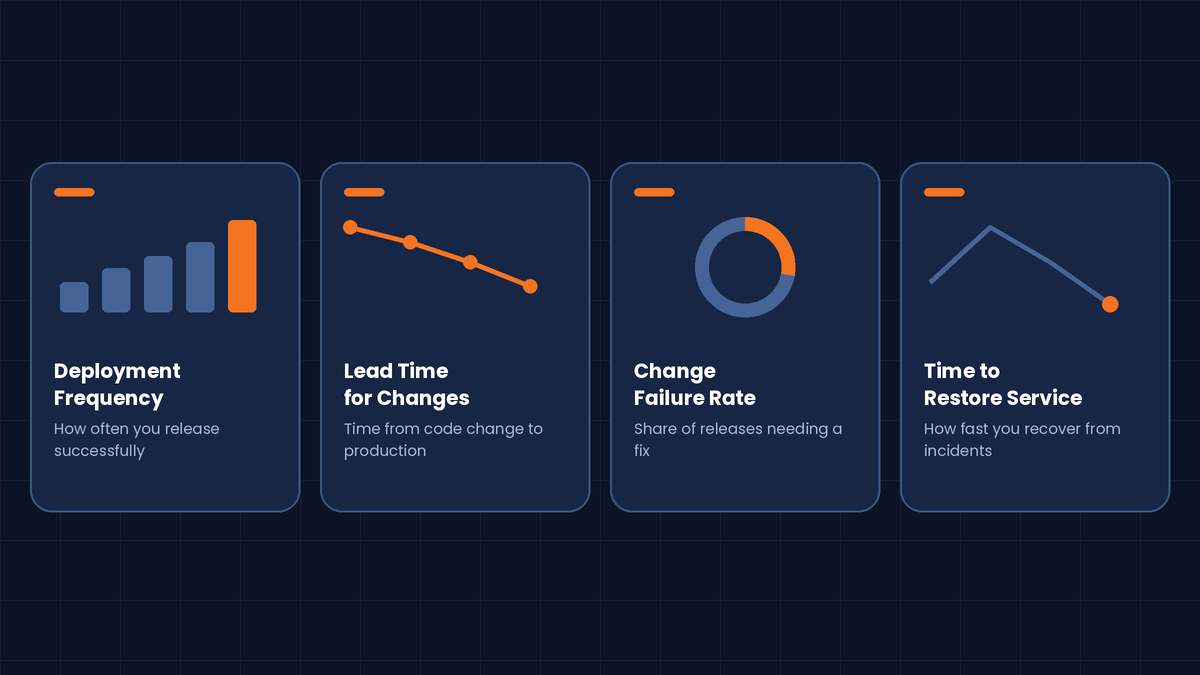 Useful metrics include:
- Deployment frequency: How often the team successfully releases software.
- Lead time for changes: How long a code change takes to reach production.
- Change failure rate: The proportion of deployments that require remediation or cause a service issue.
- Time to restore service: How quickly the team recovers from a production incident.
- Build duration: How long a pipeline takes to complete its build stages.
- Pipeline success rate: How often pipeline runs complete successfully.
Establish a baseline before making major changes and compare results over time. Interpret metrics in context because application complexity, team size, and release policies can affect performance.
For CTOs, business owners, and IT managers, these measurements help connect engineering improvements with delivery predictability and operational efficiency.
How Spiral Mantra Can Help with DevOps Consulting
Improving software delivery requires an understanding of existing technology, business priorities, and operational challenges.
Spiral Mantra provides technology consulting and software development services, including DevOps consulting. Organizations considering improvements can review their workflows, infrastructure, automation requirements, and delivery goals to identify areas that need attention.
Depending on the agreed project scope, an engagement may focus on pipeline design, deployment automation, infrastructure workflows, testing integration, or ongoing optimization.
A practical starting point is to identify the biggest delivery bottlenecks, establish measurable goals, and create a phased improvement plan.
Explore the Spiral Mantra DevOps Consulting Services page to learn more about the available services.
Conclusion
Azure DevOps Consulting Services help businesses move from manual and inconsistent releases toward a more structured software delivery process.
By combining source control, automated testing, CI/CD pipelines, infrastructure automation, and security controls, organizations can reduce repetitive work and improve release consistency.
However, successful implementation requires more than configuring a tool. Businesses need clear objectives, suitable testing, secure access, monitoring, and regular improvement.
Start by identifying the delivery problems that matter most, measuring the current process, and introducing automation in manageable stages. With the right strategy and technical support, Azure DevOps can become a valuable part of a scalable software delivery system.
Frequently Asked Questions (FAQs)
Q1. What are Azure DevOps Consulting Services?
Azure DevOps Consulting Services help businesses implement and improve software delivery using Microsoft Azure DevOps. Services may include CI/CD pipeline setup, automated testing, repository management, deployment automation, Infrastructure as Code, security integration, and ongoing optimization.
Q2. What is Azure DevOps used for?
Azure DevOps is used to plan development work, manage source code, build applications, run tests, manage software packages, and deploy applications. Its tools help development, QA, and operations teams coordinate software delivery.
Q3. What is an Azure DevOps CI/CD Pipeline?
An Azure DevOps CI/CD Pipeline is an automated workflow that builds, tests, and prepares or deploys software changes. It moves validated changes through defined stages and environments using configured checks and deployment conditions.
Q4. How does Azure DevOps Automation work?
Azure DevOps Automation uses pipelines, scripts, triggers, templates, and integrations to perform repetitive tasks. These may include building code, running tests, provisioning infrastructure, creating packages, and deploying approved releases.
Q5. What are Azure DevOps Pipelines?
Azure DevOps Pipelines is a service that automates software builds, testing, and deployment. It supports many programming languages and platforms and can deploy to Azure, other cloud platforms, and supported on-premises environments.
Q6. What is the difference between Azure DevOps and DevOps?
DevOps is a set of practices and a working culture that brings software development and IT operations together. Azure DevOps is Microsoft's platform that provides tools to support planning, coding, testing, and software delivery.
Q7. How much do Azure DevOps Consulting Services cost?
Costs depend on project complexity, application count, infrastructure, security requirements, integrations, and ongoing support. Request an assessment and a defined scope to receive an estimate appropriate to your requirements.
Q8. How long does it take to implement Azure DevOps CI/CD?
A straightforward pipeline may take days to a few weeks, depending on application readiness and testing requirements. Complex implementations involving multiple applications, legacy systems, security controls, and infrastructure changes can take longer. Agree on a realistic timeline after an initial assessment.
Q9. How do I choose the right Azure DevOps Consultant?
Choose a consultant with relevant implementation experience, knowledge of your technology stack, a security-focused approach, clear deliverables, and a commitment to documentation and knowledge transfer. Ask how results will be measured and what support will be available after implementation.
Q10. Can Azure DevOps Pipelines deploy applications outside Microsoft Azure?
Yes. Azure Pipelines can support deployments to other cloud platforms and on-premises environments when the necessary agents, integrations, credentials, and security configurations are available. The setup depends on the target infrastructure.