What Happens When DevOps Starts Managing Production Deployments
In today's fast-paced digital landscape, releasing software quickly is no longer enough. Businesses must also ensure every deployment is secure, reliable, scalable, and delivers an exceptional customer experience. This is where DevOps release management in the production deployment process.
Traditionally, production deployments were handled by operations teams after developers completed coding. The process often involved manual approvals, lengthy release windows, unexpected downtime, and communication gaps between development and operations. These challenges slowed innovation and increased deployment risks.
Our DevOps Consulting Services have shifted toward DevOps-driven production deployments, where development, operations, QA, security, and business teams collaborate throughout the software lifecycle. Instead of treating deployment as the final step, DevOps integrates automation, continuous testing, monitoring, infrastructure management, and security into every release.
As a result, organizations can deploy multiple times a day with greater confidence, reduced downtime, faster recovery, and improved customer satisfaction.
In this guide, we'll explore what really happens when DevOps starts managing production deployments, why companies are adopting this approach, the technologies involved, best practices, common challenges, and how businesses can successfully implement DevOps deployment strategies.
Traditional Production Deployment Process
Before DevOps became mainstream, software deployment followed a highly sequential workflow.
A typical process looked like this:
Developer → QA → Release Team → Operations → Production
This approach created several bottlenecks:
Manual Processes: Deployments often relied on scripts executed manually by operations engineers.
Communication Gaps: Different teams worked in silos, leading to misunderstandings and deployment delays.
Long Release Cycles: Many organizations released software monthly or quarterly because deployments were risky and time-consuming.
High Failure Rates: Manual configuration changes frequently caused production failures.
Difficult Rollbacks: Recovering from failed deployments required significant manual intervention.
These limitations made innovation slower and increased operational costs.
What Changes When DevOps Owns Production Deployments
1. Deployments Become Automated, Not Manual
The most immediate shift is automation. Instead of an engineer manually SSHing into servers or running scripts by hand, deployments run through CI/CD pipelines — Jenkins, GitLab CI, GitHub Actions, Azure DevOps, or similar tools. Code moves from commit to production through a repeatable, version-controlled pipeline rather than a person's memory of "the steps."
What this solves:
Removes human error from repetitive tasks
Makes every deployment auditable and reproducible
Cuts deployment time from hours to minutes
2. Release Frequency Increases Significantly
When deployments are automated and low-risk, teams stop batching changes into big, infrequent releases. Instead, they ship smaller changes more often. This is a core principle of DevOps release management — breaking large releases into smaller, independently deployable units that are easier to test, roll back, and monitor.
Smaller releases mean:
Easier root-cause analysis when something goes wrong (fewer changes to investigate)
Faster feedback loops from users and monitoring systems
Reduced "blast radius" if a deployment fails
3. Infrastructure Becomes Code
Production environments stop being manually configured servers and start being defined in code — using tools like Terraform, Ansible, Pulumi, or CloudFormation. This means the infrastructure that supports a deployment is version-controlled, peer-reviewed, and testable, just like application code.
This also eliminates configuration drift between staging and production — one of the most common causes of "it worked in testing" failures.
4. Monitoring and Rollbacks Become Built-In, Not an Afterthought
DevOps-managed deployments are rarely "deploy and hope." They come paired with:
Automated health checks post-deployment
Real-time monitoring and alerting (Prometheus, Grafana, Datadog, New Relic, etc.)
Automated or one-click rollback mechanisms
Canary releases and blue-green deployments to limit exposure before a full rollout
If something breaks, the system detects it and can roll back before a human even notices — instead of waiting for a customer complaint.
5. Ownership Shifts to "You Build It, You Run It"
Perhaps the biggest cultural change: developers no longer hand off code and disappear. Under DevOps, the team that writes the code is often responsible for its behavior in production, including being part of on-call rotations. This closes the feedback loop — engineers see the real-world impact of their code, which naturally improves code quality and operational awareness.
6. Security Gets Baked Into the Pipeline
Mature DevOps deployment models fold security scanning, dependency checks, and compliance gates directly into the CI/CD pipeline (often called DevSecOps). Vulnerabilities get caught before deployment rather than after an incident, and security is no longer a separate, slower approval stage bolted onto the end of the process.
The Business Impact of DevOps-Managed Deployments
| Before DevOps | After DevOps Manages Deployments |
|---|---|
Releases every few weeks/months |
Releases multiple times per day/week |
Manual, error-prone deployment steps |
Automated, repeatable pipelines |
Long recovery time after failures |
Minutes-level recovery via automated rollback |
Siloed Dev and Ops teams |
Shared ownership and accountability |
Reactive monitoring |
Proactive, automated alerting |
Organizations that formalize this shift typically see measurable gains in deployment frequency, change failure rate, and mean time to recovery (MTTR) — the same DORA metrics used industry-wide to benchmark engineering performance.
The DevOps Production Deployment Lifecycle
Modern production deployments follow a continuous lifecycle rather than isolated release events.
1. Planning
Business requirements are translated into development tasks.
Sprint planning and backlog prioritization begin.
2. Development
Developers write code using version control systems like Git.
Feature branches enable parallel development.
3. Continuous Integration
Every commit triggers:
Code compilation
Automated testing
Static code analysis
Security scanning
Only verified code progresses through the pipeline.
4. Build
Application artifacts are generated automatically.
Examples include:
Docker images
JAR files
NuGet packages
Container images
5. Automated Testing
Multiple testing layers validate software quality before deployment.
These include:
Functional testing
Performance testing
UI testing
API testing
Load testing
Security testing
6. Deployment
Applications are deployed automatically using CI/CD pipelines.
Popular deployment tools include:
Jenkins
GitHub Actions
GitLab CI/CD
Azure DevOps
Argo CD
Spinnaker
7. Production Monitoring
Deployment does not end after release.
DevOps continuously tracks:
Application performance
Infrastructure health
User behavior
Business metrics
Security events
Monitoring provides immediate visibility into production environments.
8. Continuous Feedback
Customer feedback, logs, monitoring data, and performance metrics guide future improvements.
Every deployment becomes an opportunity for learning and optimization.
CI/CD: The Foundation of Modern Production Deployments
Continuous Integration and Continuous Delivery (CI/CD) form the backbone of DevOps-managed deployments.
A CI/CD pipeline automates the entire software release process, from code commit to production.
Key Benefits
Faster deployments
Consistent releases
Reduced manual effort
Improved software quality
Lower deployment risk
Easier rollback
Better developer productivity
Organizations with mature CI/CD pipelines often achieve significantly higher deployment frequency while maintaining reliability.
DevOps Release Management
Traditional release management focused on scheduling releases and coordinating teams manually.
Modern DevOps release management emphasizes automation, collaboration, and continuous improvement.
A mature release management process includes:
Automated release pipelines
Version control
Change tracking
Release approvals
Risk assessment
Rollback planning
Compliance validation
Deployment monitoring
This approach enables organizations to release software rapidly without compromising stability or governance.
Infrastructure as Code (IaC): Building Consistent Production Environments
One of the biggest improvements DevOps brings to production deployments is Infrastructure as Code (IaC). Instead of configuring servers manually, infrastructure is defined using code, making environments repeatable, version-controlled, and easy to recreate.
Popular IaC tools include:
Terraform
AWS CloudFormation
Azure Resource Manager (ARM)
Pulumi
Ansible
GitOps: The Next Evolution of Production Deployments
GitOps extends DevOps by using Git as the single source of truth for infrastructure and application deployments.
Every infrastructure change is:
Reviewed through pull requests
Version controlled
Automatically synchronized
Easily reversible
Production Deployment Strategies Every DevOps Team Should Know
1. Blue-Green Deployment
Two identical production environments are maintained:
Blue (current production)
Green (new version)
Traffic is switched to the Green environment only after validation.
Benefits
Near-zero downtime
Easy rollback
Minimal production risk
2. Canary Deployment
The new release is deployed to a small percentage of users first.
If no issues are detected, the deployment gradually expands to all users.
Benefits
Reduced deployment risk
Real user validation
Faster issue detection
3. Rolling Deployment
Application instances are updated incrementally without taking the entire service offline.
Ideal for large-scale cloud applications.
4. Recreate Deployment
The existing application is shut down before the new version is deployed.
Although simple, this strategy results in downtime and is generally suitable only for non-critical applications.
5. Feature Flags
Feature flags allow teams to deploy code without immediately exposing new functionality to users.
This enables:
Safer releases
A/B testing
Controlled feature rollouts
Instant feature rollback without redeployment
DevSecOps: Integrating Security into Every Deployment
Security should not be an afterthought. DevSecOps integrates security practices into every phase of the DevOps lifecycle.
Key DevSecOps Practices
Static Application Security Testing (SAST)
Dynamic Application Security Testing (DAST)
Dependency vulnerability scanning
Container security scanning
Secret management
Infrastructure security validation
Compliance automation
By embedding security into CI/CD pipelines, organizations reduce vulnerabilities while maintaining deployment speed.
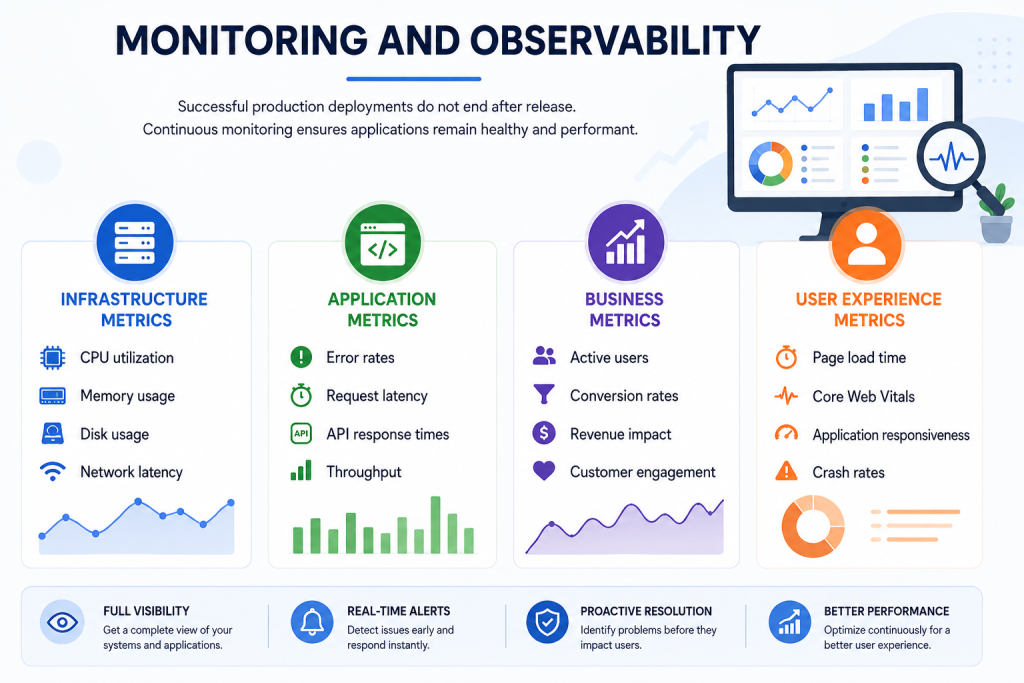
Monitoring and Observability
Observability: Beyond Monitoring
Monitoring tells you what happened.
Observability helps explain why it happened.
A strong observability strategy combines:
Logs
Metrics
Distributed tracing
Application Performance Monitoring (APM)
Popular observability platforms include Prometheus, Grafana, Datadog, New Relic, Splunk, and Elastic Stack.
Measuring Deployment Success with DORA Metrics
High-performing DevOps teams rely on DORA (DevOps Research and Assessment) metrics to evaluate software delivery performance.
1. Deployment Frequency
How often code is successfully deployed to production.
2. Lead Time for Changes
The time from code commit to successful production deployment.
3. Mean Time to Recovery (MTTR)
The average time required to recover from production failures.
4. Change Failure Rate
The percentage of deployments that result in incidents, rollbacks, or service disruptions.
Improving these metrics helps organizations deliver software faster while maintaining high reliability.
The Role of AI in Modern DevOps
Artificial Intelligence is transforming how DevOps teams manage production deployments.
AI-Powered Capabilities
Predictive failure analysis
Intelligent anomaly detection
Automated root cause analysis
Log analysis
Deployment recommendations
Capacity forecasting
Automated incident response
AI-assisted code reviews
Release risk prediction
As AI capabilities mature, organizations can proactively identify issues before they affect end users, leading to more reliable and efficient deployments.
Common Challenges When DevOps Manages Production Deployments
Cultural Resistance - Transitioning from siloed teams to a collaborative DevOps culture requires organizational change.
Legacy Systems - Older applications may not support modern automation practices.
Tool Complexity - Managing multiple DevOps tools without standardization can increase operational overhead.
Skills Gap - Successful DevOps adoption requires expertise in automation, cloud platforms, CI/CD, security, and infrastructure management.
Compliance Requirements - Industries such as healthcare, finance, and government must ensure deployments comply with strict regulatory standards.
Why Businesses Choose Professional DevOps Partners
Building an efficient DevOps ecosystem requires strategic planning, automation expertise, and continuous optimization. Many organizations collaborate with experienced providers to accelerate their DevOps journey.
Partnering with a trusted DevOps Services Company helps businesses implement scalable CI/CD pipelines, cloud-native architectures, infrastructure automation, and deployment best practices while reducing operational risks.
Similarly, specialized DevOps Consulting Services enable organizations to assess their existing processes, modernize legacy systems, improve deployment reliability, and establish a roadmap aligned with business goals.
Strong DevOps release management practices ensure software releases remain consistent, auditable, secure, and aligned with organizational governance, allowing teams to deliver innovation without compromising stability.
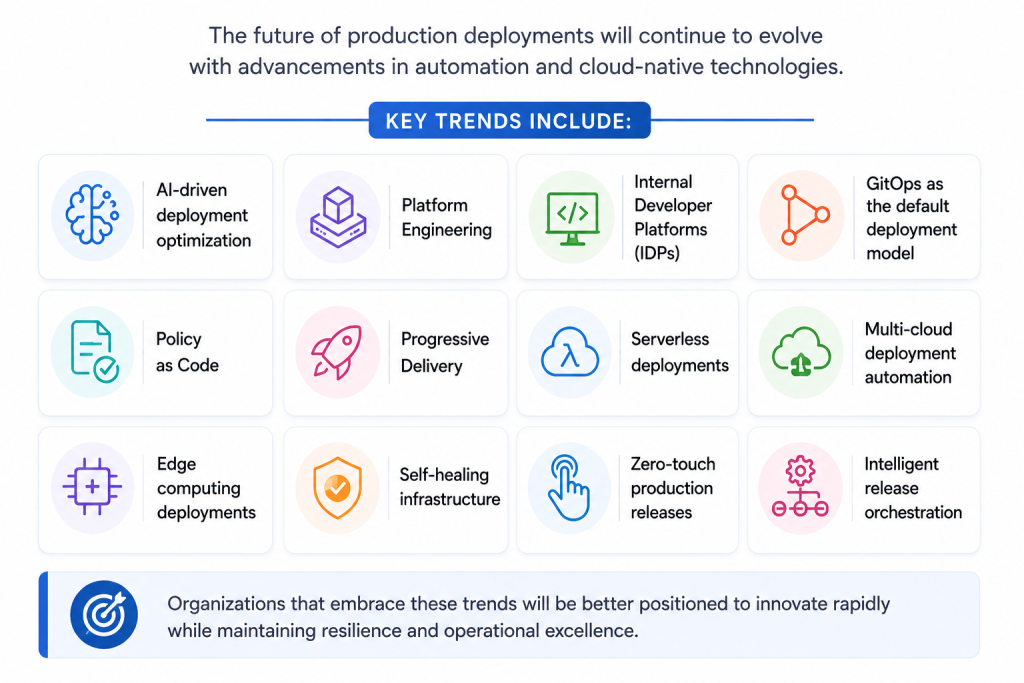
Future Trends in Production Deployments
Conclusion
Production deployments have evolved from complex, manual operations into highly automated, intelligent, and collaborative processes. When DevOps takes ownership of production deployments, organizations gain the ability to deliver software faster, improve release quality, strengthen security, and respond to customer needs with greater agility.
By adopting CI/CD pipelines, Infrastructure as Code, GitOps, DevSecOps, comprehensive monitoring, and AI-driven automation, businesses can transform software delivery into a strategic advantage rather than a technical bottleneck.
Whether you're modernizing legacy systems or building cloud-native applications, investing in mature DevOps practices is essential for achieving long-term scalability and resilience. Working with an experienced DevOps Services Company and leveraging expert DevOps Consulting Services can accelerate this transformation. Combined with effective DevOps release management, organizations can ensure every production deployment is secure, predictable, and aligned with business objectives.
Frequently Asked Questions (FAQs)
Q1. What does it mean for DevOps to "manage" production deployments?
It means the deployment process — from code commit to live release — is handled through automated CI/CD pipelines, monitored systems, and shared team ownership, rather than manual handoffs between separate development and operations teams.
Q2. Does DevOps eliminate the need for a dedicated operations team?
No. DevOps changes how Dev and Ops collaborate, not whether operations expertise is needed. Many organizations still have platform or SRE teams; the difference is that responsibility for deployment outcomes is shared rather than siloed.
Q3. How does DevOps reduce downtime during deployments?
Through practices like canary releases, blue-green deployments, automated health checks, and instant rollback mechanisms, which catch and contain issues before they affect all users.
Q4. What tools are commonly used when DevOps manages deployments?
Common tools include Jenkins, GitHub Actions, GitLab CI/CD, Terraform, Ansible, Kubernetes, Docker, Prometheus, and Grafana — though the exact stack depends on the organization's infrastructure and goals.
Q5. Is DevOps release management only for large enterprises?
No. Startups and mid-sized companies benefit just as much, often more, since automated release pipelines let smaller teams ship reliably without needing a large dedicated operations staff.
Q6. How do I know if my organization is ready to let DevOps manage production deployments?
If deployments are frequent sources of stress, downtime, or manual errors, that's usually a sign it's time. A readiness assessment from a DevOps Services Company can help identify gaps in your current pipeline, monitoring, and team processes before making the shift.
Q7. How long does it take to transition to DevOps-managed deployments?
It varies by organization size and existing infrastructure maturity — some teams see meaningful improvements within a few weeks of implementing CI/CD, while a full transformation with robust monitoring and automated rollback can take a few months.